The ScopeAxis Workflow
Nine steps from brief to billable — every engagement, every time
ScopeAxis guides your presales team through a structured nine-step workflow. Every step is AI-assisted.
Every output is checked before it leaves. Every document is client-ready when it arrives.

Step 01 - Ingest
Upload anything. ScopeAxis reads it all
Start with whatever the client sent you. A PDF brief, a Word RFP, a scanned image, an email chain pasted as plain text, or a hand-written scope note photographed on your phone. ScopeAxis accepts all of it. Everything is extracted, structured, and fed into the analysis pipeline automatically with no manual copying, no reformatting, no lost context.
What you can upload:
- PDF documents - RFPs, briefs, tender documents, previous proposals
- Word documents - Existing SOWs, requirements documents, meeting notes
- Images - Scanned documents, whiteboard photos, hand-written notes
- Plain text - email content, Slack messages, copied web content
You do not need a perfectly formatted brief to start.
ScopeAxis works with what real clients actually send as you know is rarely a clean document.

Step 02 - Analysis
AI reads between the lines
Once your documents are ingested, ScopeAxis analyses the content using AI. It identifies stated requirements, surfaces implied requirements the client did not explicitly write, flags ambiguities that could cause scope disputes later, and highlights gaps such as where the brief says nothing but the engagement will need a decision. All of this happens before you start scoping. You see the full picture before you commit to anything.
- A structured requirements list extracted from all ingested documents
- Ambiguity flags - Statements that could be interpreted more than one way
- Gap flags - Areas the brief does not address but the engagement will need
- Contradiction flags - Places where two parts of the brief disagree
Most scope disputes happen because something ambiguous in the brief was interpreted differently by the client and the delivery team. Analysis catches those before they become problems.

Step 03 - Clarifications
The questions you need to ask, already written.
Based on the analysis, ScopeAxis generates a structured set of clarification questions specific to your engagement. Not generic questions, questions derived from the actual gaps and ambiguities found in your client's brief. Review them, edit them, remove the ones you already know the answer to, and send the rest to your client. Their responses flow back into the engagement and inform the scope, estimates, and documents that follow.
- A prioritized list of questions grouped by topic area
- Each question linked to the specific gap or ambiguity that generated it
- A client-facing clarification document you can send directly
- A record of client responses stored against the engagement
Sending structured clarification questions early signals professionalism to your client. It shows you read their brief carefully and that you take scope precision seriously before you price anything.
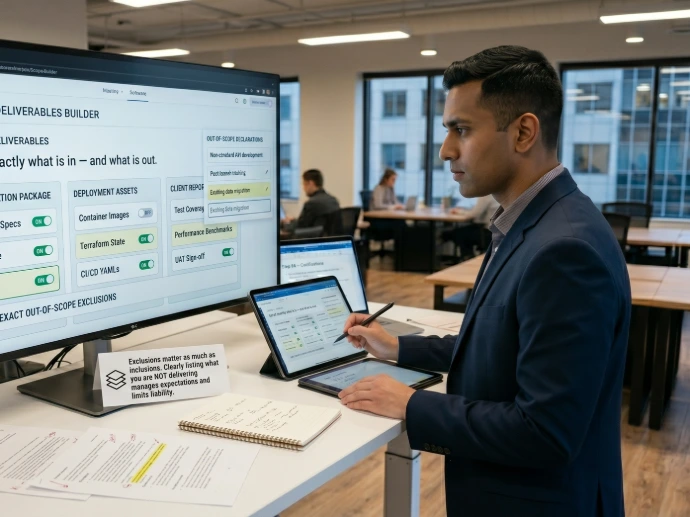
Step 04 - Scope Builder
Define exactly what is in and what is out.
The Scope Builder is where you make the decisions that shape the entire engagement. Activate the sections relevant to your practice area such as Software Development, DevOps & Platform Engineering, or Managed Services. Toggle individual scope items on or off. Define what is explicitly out of scope. The system builds your scope structure based on your selections, ensuring every section that should be present is present and every exclusion is documented.
- Select your practice area - Software Development, DevOps & Platform Engineering, or MSP
- Toggle scope sections on or off - only the sections relevant to this engagement are included
- Activate optional specialist modules - from 17 DevOps modules to 12 MSP add-ons
- Define explicit out-of-scope items - documented and carried into both the Proposal and SOW automatically
Out-of-scope is as important as in-scope. The Scope Builder forces you to be explicit about both which protects you legally and sets accurate client expectations before anything is signed.

Step 05 - Estimates
A full WBS: Structured, auditable, and consistent.
ScopeAxis generates a Work Breakdown Structure from your scope selections. Every deliverable is broken into tasks. Every task has an effort estimate in hours, a role assignment, and a risk level. The WBS is AI-assisted which proposes estimates based on the scope defined but you review and adjust every line before anything is locked. The output is a structured, auditable estimate that any team member can read, defend, and build a price from.
- A full WBS with tasks, subtasks, effort hours, and role assignments
- Risk level per task - Low / Medium / High
- Total hours per role across the engagement
- A basis for the commercial inputs in Step 07
Consistent estimates are a team discipline problem as much as a tools problem. When every engineer uses the same WBS structure for the same engagement type, your estimates become more accurate over time , because you can compare them against what delivery actually took.
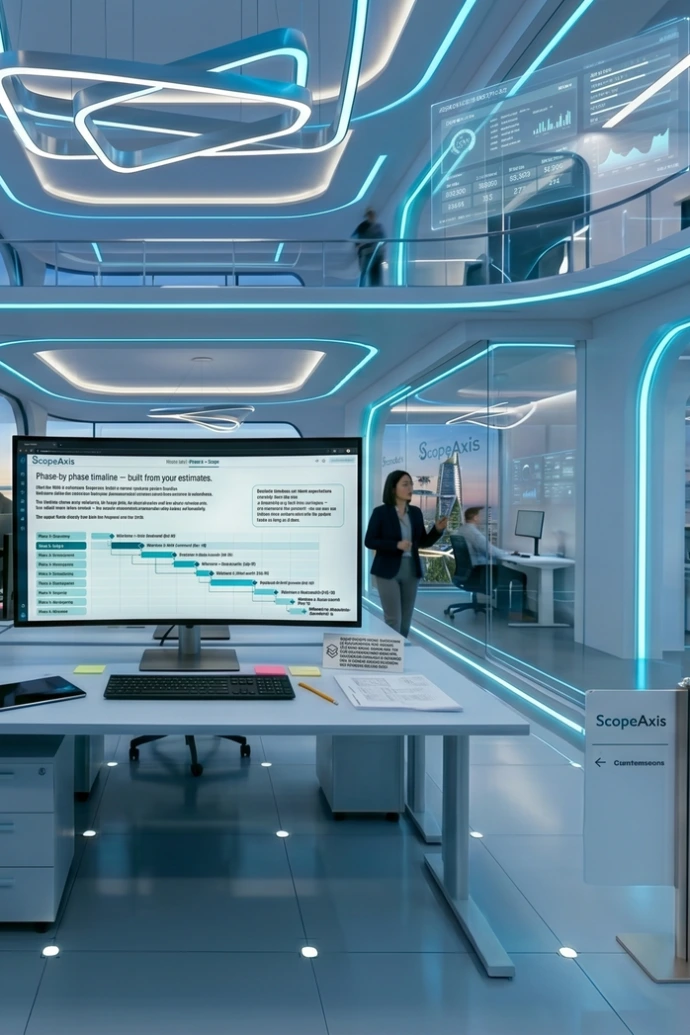
Step 06 - Timeline
Phase-by-phase timeline, built from your estimates.
Once the WBS is confirmed, ScopeAxis builds a phase-by-phase project timeline. Milestone dates are calculated from your proposed start date and the effort estimates in each phase. The timeline shows every milestone, its target date, its dependencies, and the phase it belongs to. You adjust dates where needed and the system recalculates downstream milestones automatically. The output feeds directly into both the Proposal and the SOW.
- A phase-by-phase engagement timeline
- Named milestones with target dates per phase
- A Gantt-style view for review and adjustment
- Timeline data that populates Section 4 of the SOW automatically
Realistic timelines set client expectations correctly from day one. A timeline that is built from estimates, not guessed in the proposal which you can defend when a client asks why the project takes as long as it does.

Step 07 - Commercial Inputs
Pricing, terms, and billing: Pre-filled where possible.
Commercial Inputs is where you confirm the financial and legal parameters of the engagement. Your Company Profile pre-fills rate cards, payment terms, late payment rates, governing law, and authorized signers, so the fields that are the same on every engagement are already done. You enter the engagement-specific values: total fee, billing model, milestone payment amounts, and any client-specific commercial terms. Everything entered here flows into both the Proposal pricing section and the SOW commercial terms automatically.
- Billing model - Fixed-Price, T&M, Agile-Sprint, Monthly Retainer, or Hybrid
- Total engagement fee and payment milestone amounts
- Payment terms and late payment interest rate
- IP ownership selection: Assigned, licensed, or governed by MSA
- Warranty period and post-delivery support option
- Governing law and dispute resolution method
Commercial Inputs is the step where most proposals get delayed where someone has to go and find the rate card, confirm the payment terms, and decide on IP ownership. ScopeAxis pre-fills everything that is standard for your organization, so you only need to enter what is engagement-specific.

Step 08 - Preflight
The quality gate. Nothing gets generated until it passes.
Preflight is the step that makes ScopeAxis different from a document template. Before any proposal or SOW is generated, the system checks every mandatory field across every section. Fields that AI cannot generate because they require human judgement, client-specific decisions, or named individuals which are flagged as incomplete. You cannot generate until every mandatory input is resolved. This means every document that leaves ScopeAxis is complete. Not mostly complete. Not complete except for that one section. Complete. If something is missing Preflight shows you exactly which fields are incomplete, which section they belong to, and why they are mandatory. Click any flagged item to jump directly to that field. Resolve everything, return to Preflight, and generate.
- All mandatory fields in every activated section
- Named individuals required before generation: e.g., authorized signers, DevOps Champion, client IT contacts
- Legal selections that must be made such as IP ownership, post-warranty support option, governing agreement type
- Scope boundaries: In-scope and out-of-scope must both be explicitly defined
- Commercial terms - Total fee, billing model, and payment schedule must be confirmed
- DPA trigger checklist - If any personal data is involved, the DPA determination must be recorded
AI is exceptional at generating structured prose, narratives, and legal language from your inputs. It cannot generate your client's company name, your agreed fee, your IP decision, or your warranty period. Preflight ensures those things are always present because a document missing any of them is not ready to send.

Step 09 - Generate
Your Proposal and SOW. Branded, structured, and ready.
Once Preflight passes, you choose what to generate. A Proposal only, a SOW only, or both together. Select your document type: There are six Proposal types and six SOW types for Software Development, five of each for DevOps, and four of each for Managed Services. ScopeAxis generates the documents, applies your branding from the Company Profile, and makes them available for download immediately. Word, PDF, or Google Docs , whichever format your client expects.
Software Development - 6 types each:
DevOps & Platform Engineering - 5 types each:
Managed Services (MSP) - 4 types each:
Supplemental / Project-Based Proposal · Supplemental / Project-Based SOW
Values entered once populate both documents automatically. Your client's company name, project objectives, team structure, fees, and timeline appear in the correct section of both the Proposal and the SOW, you never enter the same information twice.

Nine steps . One session . Client-ready documents
Start your free 14-day trial and run your next real engagement through the full ScopeAxis workflow. No templates to fill. No blank pages to write. No mandatory fields left empty.
No credit card required
Cancel anytime
Your first Proposal and SOW are free